Inviting hosts to your agency is at the heart of what it means to be a Vone Live agent — and it’s where the majority of your income comes from. Knowing how to do it right is key. The process itself is simple enough, so let’s get straight into how you can start inviting Vone Live hosts into your team.
How to Invite Vone Live Hosts Tutorial
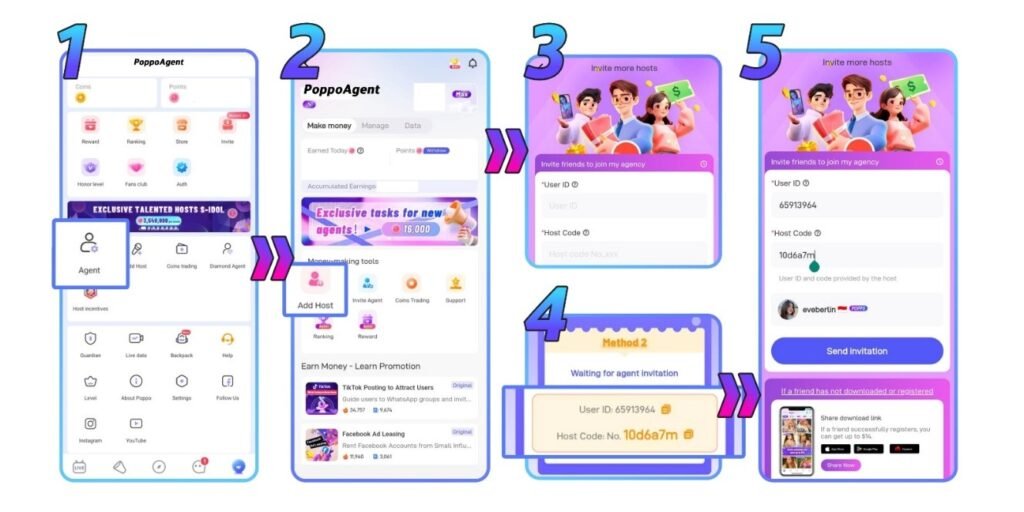
- Go to your ‘Agent’ menu
To start, open your profile and look for the ‘Agent’ menu in the middle of the screen. Click it to proceed. - Select ‘Add Host’ button
In the middle of the ‘Agent’ menu, click the ‘Add Host’ button. - Enter the Hosts’ ID and code
You can get the ID and code from the host you want to invite. - Example of Hosts’ ID and code
Here’s an example of what the ID and code looks like. - Send the Invitation
Once you have the ID and code, send the invitation by clicking the ‘Send Invitation’ button.
- Host will receive a messageThe host will then receive an invitation message on their Vone Live app.
- Host accepting invitation
On this step, the host can either accept or reject your invitation. - Congratulations!
If they accepted, congratulations! They’re now officially a part of your agency.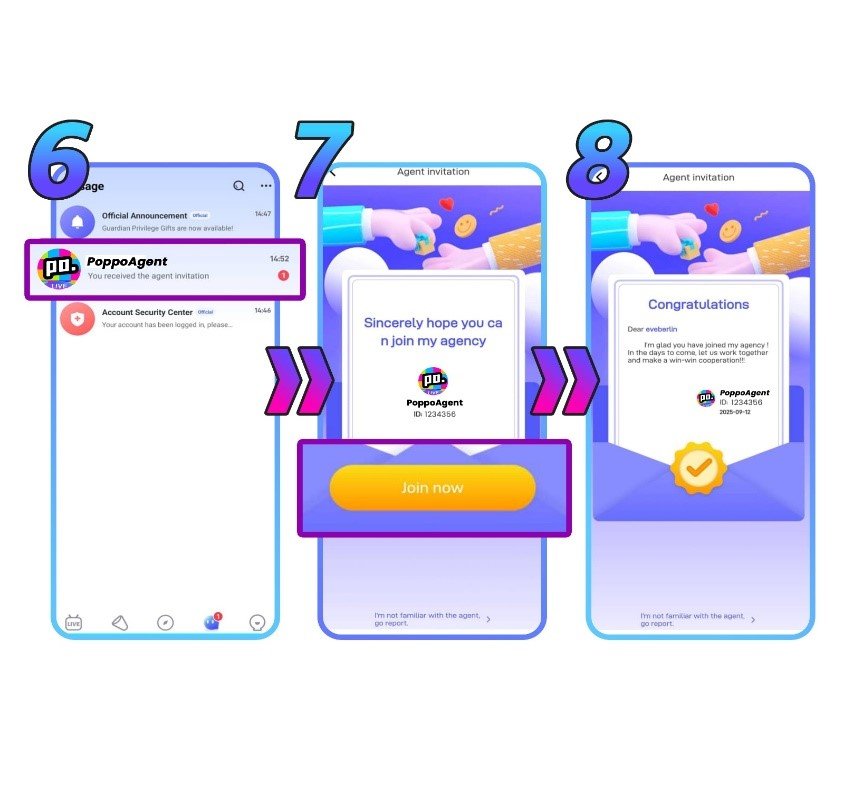
Vone Live Host Invitation General Problems
- I invited new hosts but they can’t join my agency
This can occur when either the host’s ID or code is wrong, or they have already joined another agency. - I want to add a new host that is currently in another agency
Unfortunately you can not. You have to wait for the host to leave their current agency first.
How to Invite Vone Live Hosts FAQs
- Are there any requirements I need to meet as an agent?
Yes, there are performance targets tied to both recruitment and your team’s overall activity. If your hosts and sub-agents go inactive for a full month, your agency will be closed and all members will be moved under the platform’s official agency. Since requirements can be updated from time to time, reach out to our team to get the latest details. - What if I don’t have the host’s ID or code?
Unfortunately, you need both information to invite the host into your agency.
Conclusion
That covers everything you need to get started with inviting hosts to your Vone Live agency. At the end of the day, the more active hosts you bring in, the more your team, and your earnings grow. Got questions about the invitation process or anything else that comes with being a Vone Live agent? Our team is always just a message away. And don’t forget to check out our blog for more guides and tips coming your way.