

Already registered as a Vone Live host? The next step is completing your Vone Live host face verification. It’s a quick and simple process that every host is required to finish before going live or making their first withdrawal. Before we walk you through the full Vone Live host face verification tutorial, here’s what you’ll need to have ready.
Requirements
- Match Your Verification and Profile Images
The face verification process involves two parts, a photo and a video. The photo you submit needs to be a current, clear image of yourself that matches the profile picture on your account. - Phone with a Working Front-Facing Camera
A functioning front-facing camera is essential for the video verification step. Before you begin, also make sure you’re in a well-lit space so your face comes through clearly in the recording.
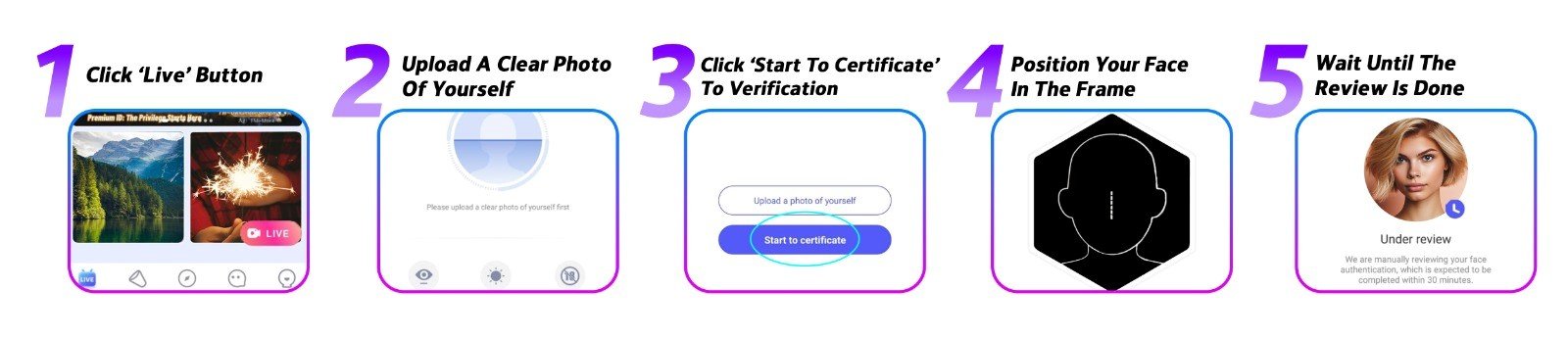
Vone Live Face Verification Tutorial
- Open Vone Live homepage
Start by opening the Vone Live app and heading to the homepage. From there, tap the - Upload a clear photo of yourself
You’ll be asked to upload a photo of yourself as the first part of the verification. Make sure the image is recent, well-lit, and clearly shows your face. Once you’re happy with the photo, tap - Click ‘Start to Certificate’ to begin verification
This will take you to the next stage where the real-time verification begins, so make sure you’re in a good spot before tapping through. - Follow the on-screen instructions
The app will guide you through the verification steps in real time. To make sure everything goes smoothly, keep these things in mind:- Make sure you are in a well-lit room (avoid backlighting)
- Remove hats, glasses, masks, or accessories that cover your face
- Use the front camera in clear conditions
- Submit and wait for review
Once you’ve completed the steps, go ahead and submit your verification. From there, it’s just a matter of waiting for the review to be completed. Here’s what to expect after submitting:
-
- The verification process can take up to 1-3 business days.
- If you pass, your account will officially become a verified host
- If it fails, you can repeat the verification. If you think you fails the process the process too often, contact our team.
Face Verification Common Problems
- The App Won’t Access My Camera
Make sure Vone Live has camera permissions enabled in your phone’s settings, and check that you’re running the latest version of the app. If the issue persists, try restarting your device or switching to a different phone. - My Face Verification Is Still Under Review
Most reviews are completed in under a minute, but some cases may take up to 3 business days if manual review is needed. If yours is taking longer than that, feel free to reach out to our team for an update. - My Face Verification Was Rejected
This usually happens when the submitted video doesn’t match your profile photo, or when more than one person appears in the frame. Double-check your profile picture and give the verification another go.
Vone Live Face Verification FAQs
- What happens if I skip the face verification?
Without completing face verification, you won’t be able to go live and withdraw any of your earnings as a Vone Live host. - What if I mess up during the video verification instructions?
No worries, you’re free to retry the video verification as many times as you need until it goes through successfully. - Why does the app request another face verification once in a while?
This is simply part of the platform’s security system to keep your account protected. Complete the process whenever prompted to make sure your account stays active - What should I do if my face verification keeps getting rejected?
You’re allowed to attempt verification multiple times per day. If you hit the daily limit, wait 24 hours before trying again. If rejections keep happening, don’t hesitate to contact our support team for further assistance.
Small Step That Makes a Big Difference
Without it, you won’t be able to go live or access your earnings, so the sooner you get it done, the better. We’ve covered everything you need to make the process as smooth as possible, so there’s nothing to worry about. Still have questions about verification or anything else on the platform? Our team is always happy to help. Feel free to browse our blog as well for more official Vone Live tips and guides.